
Do This Now
- 1 Audio recording starts at Producer Edition. Fruity Edition cannot record audio at all, so if you want to track vocals, Fruity is the wrong buy.
- 2 Producer Edition is the default pick for beat makers. It adds audio recording, 2 audio editors (Edison and Newtime), 59 effects and 27 instruments.
- 3 FL Studio Producer vs Signature comes down to plugins, not features. Signature adds Newtone pitch correction, a third audio editor and more effects, on top of everything Producer does.
- 4 All Plugins Edition is the only edition with Harmor, Transmitter, LuxeVerb and Drumaxx, and it is the only one at 71 effects and 39 instruments.
- 5 Updates to your edition are free forever, so the edition you buy is the ceiling you keep. You can pay the price difference to move up later, which makes buying one step low a fixable mistake, not a free one.
- 6 Image-Line only publishes a From $99 entry figure in USD. Check the current price on Image-Line's own pricing page before you commit.
Watch the technique in action, then read on for the details.
Four editions, one sequencer, and a comments section full of people who bought the wrong one. FL Studio's edition split is not about how powerful the DAW is, it is about what gets bundled with it, and one of those bundled things is the ability to record audio at all.
I went through Image-Line's own comparison page before writing this, because the third-party blog posts floating around are mostly running numbers from FL Studio 20. The current version is FL Studio 2026, and the feature splits below are what the vendor publishes today.
Here is the short version. Most beat makers want Producer Edition, vocal-heavy producers want Signature, and people who build their own patches want All Plugins. Fruity is for one specific type of person, and it is probably not you.
The One Fact That Decides It: Audio Recording Starts at Producer Edition
Fruity Edition cannot record audio. Not vocals, not a guitar, not a line in from your SP-404. Image-Line's comparison lists audio recording as a no for Fruity and a yes for Producer, Signature and All Plugins.
That is the whole game for most people reading this. If a rapper is ever going to sit in your room and lay a verse, or if you want to sing a hook and chop it, Fruity is a dead end on day one. You can still drag in a WAV someone else recorded, but you cannot capture one.
The friction nobody warns you about: the restriction is invisible until you need it. You can build beats in Fruity for six months, feel like the DAW is complete, then plug in an interface and find there is no way to arm a track. Buying Producer up front costs less annoyance than discovering this mid session with someone waiting on the mic.
- Audio recording
- Producer, Signature, All Plugins
- Fruity Edition
- Cannot record audio
- Fruity can still
- Import and play audio files
- Entry price
- From $99 USD
FL Studio Edition Comparison Table
These counts are from Image-Line's compare-editions page, read on 21 October 2026. Everything else about the DAW, the step sequencer, the piano roll, the playlist, the mixer and the automation, is the same in all four.
| Feature | Fruity | Producer | Signature | All Plugins |
|---|---|---|---|---|
| Audio recording | No | Yes | Yes | Yes |
| Audio editors | 0 | 2 | 3 | 3 |
| Effects | 53 | 59 | 65 | 71 |
| Instruments | 23 | 27 | 29 | 39 |
| Edison, Newtime | No | Yes | Yes | Yes |
| Newtone (pitch correction) | No | No | Yes | Yes |
| Transmitter, LuxeVerb, Harmor, Drumaxx | No | No | No | Yes |
| Lifetime free updates | Yes | Yes | Yes | Yes |
Read it as a plugin ladder rather than a power ladder. Nothing in the list above changes how many patterns you can write or how your mixer routes.
The friction here is the word "effects". A count of 53 against 71 sounds like a gap of eighteen things you will use, and it is not. Half the difference is specialist stuff you may open twice a year, which is why the named plugins matter more than the totals.
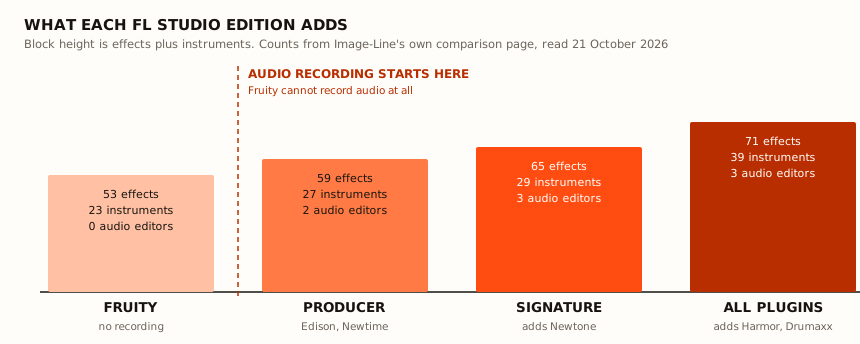
The counts climb steadily. The one step that changes what you can do sits between Fruity and Producer.
FL Studio Fruity Edition: Who It Is Actually For
Fruity makes sense for exactly one person: someone making fully in-the-box instrumentals from samples and MIDI, who will never record a live input, and who wants the cheapest legitimate way into FL Studio's workflow. At 23 instruments and 53 effects it is not a crippled demo, it is a real DAW with a hole in it.
If that is you, Fruity will carry a trap beat start to finish. The step sequencer, Fruity Slicer for chopping loops and the piano roll are all there, which is most of what making trap beats actually needs.
The friction is resale of your own time. With no Edison, you have no built-in audio editor for cleaning up a sample, trimming silence or grabbing a one-shot out of a record, so you end up bouncing files out to a free editor and back. That round trip gets old fast.
FL Studio Producer Edition: The Default Pick for Beat Makers
Producer is where the DAW stops having holes. You get audio recording, 2 audio editors (Edison and Newtime), 59 effects and 27 instruments. Edison alone is the reason most people land here, because it is the destructive editor you use to chop, clean and resample inside the project.
Newtime handles time and groove editing on audio, which matters when a sample you flipped is a few milliseconds off your grid. That is a daily problem, not a nice-to-have. If you are only now setting up, the start making beats guide assumes this tier of capability.
The friction is the stock instrument set. Producer's 27 instruments lean old, and several of them you will never load once you have a third-party synth. Budget for one good synth and one good drum sampler on top, or lean on free third-party plugins for the jobs the hi-hat programming guide covers.
- Producer adds
- Audio recording
- Audio editors
- 2 (Edison, Newtime)
- Effects
- 59
- Instruments
- 27
- Best for
- Sample-based beat makers
FL Studio Producer vs Signature: What the Extra Plugins Buy You
FL Studio Producer vs Signature is the comparison people get stuck on, and the answer is narrow. Signature does not add a sequencer feature. It adds a third audio editor, 65 effects against Producer's 59, and 29 instruments against 27, and crucially it is the first edition with Newtone.
Newtone is pitch and time correction on audio. If you record hooks, comp vocals or fix a flat note on a feature verse, that is the line in the sand. Producer plus a third-party pitch tool gets you to the same place, so the real question is whether you would rather pay Image-Line once or pay someone else once.
The friction is overlap. If you already own a pitch corrector and a decent reverb, a chunk of what Signature adds is a second copy of tools you have, and the extra stock effects will sit unopened in your plugin list. Signature earns its keep on vocal-heavy work and feels thin on instrumental-only work.
FL Studio All Plugins Edition: Harmor, Transmitter, LuxeVerb and Drumaxx
All Plugins is the only edition that includes Transmitter, LuxeVerb, Harmor and Drumaxx, and it is the only one at 71 effects and 39 instruments. Harmor is the headline, an additive and resynthesis synth that will eat a sample and let you redraw it as spectral data. Drumaxx is physically modelled percussion, which is a different sound from any sample pack you own.
This edition is for sound designers and for people who genuinely build their own patches rather than loading presets. If your workflow is sample flips and stock drums, you will pay for ten instruments you do not open.
The friction is the learning curve on the good stuff. Harmor is the most capable synth in the bundle and the least approachable, and buying All Plugins for Harmor and then never getting past its presets is a common and expensive outcome. Try the demo first.
- All Plugins exclusives
- Transmitter, LuxeVerb, Harmor, Drumaxx
- Effects
- 71
- Instruments
- 39
- Best for
- Sound designers
- Watch out for
- Harmor's learning curve
Lifetime Free Updates Make Your Edition a Ceiling
Image-Line's pricing page states that when you buy FL Studio you get all future updates to your edition free, forever, with no extra cost for new features, plugins or improvements. That is genuinely rare and it is the main reason FL Studio keeps its audience. Read the wording closely though: updates to your edition.
So your edition is a ceiling you keep for years, not a snapshot you replace. When Image-Line ships a new synth into All Plugins, a Fruity license does not inherit it. The free part applies to your tier moving forward.
The friction is how that changes the buying decision. Image-Line says you can upgrade to a higher edition at any time and pay only the price difference, with upgrades pro-rated. That makes buying one step below what you need cheap to fix and still a mistake, because you pay twice in attention and you sit without the feature until you do.
What FL Studio Actually Costs
Image-Line publishes one USD figure on its site: From $99. It does not list per-edition dollar prices, so I am not going to invent them for Producer, Signature or All Plugins.
The reason is boring and real. Image-Line prices regionally and runs sales often enough that any number I typed today would be wrong by the time you clicked, and third-party blogs quoting FL Studio 20 prices are the source of most of the confusion out there.
Open Image-Line's pricing page, pick your region and read the live number. Then compare that against what the same money buys you elsewhere, which the FL Studio vs Ableton vs Logic comparison breaks down.
Pick One in Thirty Seconds
- Recording any audio, ever: Producer at minimum.
- Vocals as a regular part of your process: Signature, for Newtone.
- Building your own patches and want Harmor: All Plugins.
- Instrumentals from samples and MIDI only, nothing ever plugged in: Fruity, and accept the Edison-shaped hole.
If you genuinely cannot decide between two neighbouring editions, take the lower one and remember the pay-the-difference upgrade exists. The one call you should not get wrong is Fruity when you meant Producer, because that one stops the session rather than slowing it down.
Frequently Asked Questions
What is the difference between the FL Studio editions?
All four editions share the same sequencer, the same piano roll and the same mixer. What changes is audio recording, the number of audio editors, and how many stock effects and instruments you get. Per Image-Line's comparison, Fruity has no audio recording, 0 audio editors, 53 effects and 23 instruments. Producer has audio recording, 2 audio editors, 59 effects and 27 instruments. Signature has 3 audio editors, 65 effects and 29 instruments. All Plugins has 3 audio editors, 71 effects and 39 instruments.
Can FL Studio Fruity Edition record vocals?
No. Audio recording starts at Producer Edition, and that is the single most common buying mistake with FL Studio. Fruity can import and play audio files, but it cannot capture a microphone or an instrument input, so a rapper or singer who buys Fruity will be stuck the first time they plug in.
FL Studio Producer vs Signature: which should I buy?
Buy Producer if you are making beats from samples and stock plugins and already own third-party effects. Buy Signature if you work with vocals, because Newtone pitch correction is Signature and up, and Signature also adds a third audio editor plus more stock effects and instruments. Neither adds a feature the other lacks in the sequencer itself, the difference is the plugin set.
Can I upgrade my FL Studio edition later?
Yes. Image-Line's pricing page states you can upgrade to a higher edition at any time and pay only the price difference, with upgrades pro-rated. So buying one step below what you need costs you time and an extra transaction rather than the full price of the higher edition.
Does FL Studio really have lifetime free updates?
Image-Line's pricing page states that when you buy FL Studio you get all future updates to your edition free, forever, with no extra cost for new features, plugins or improvements. Read the wording carefully: updates to your edition. A new plugin that ships only in All Plugins does not fall into a Fruity license.
How much does FL Studio cost in USD?
Image-Line publishes a From $99 entry figure and does not list per-edition USD prices on its site, so any dollar amount you see for Producer, Signature or All Plugins is a third party's guess or an old number. Check Image-Line's pricing page directly, and check it twice if a sale is running.
Related Articles
Best Beat Making Software and Programs to Make Beats (2026)
The best beat making software and programs to make beats, from free beat maker apps to FL Studio, Ableton and Logic, plus what you actually need to start.
Best Free VST Plugins for Beat Makers (2026)
We tested the top free VST plugins for beat makers, covering synths, effects, and mixing tools that genuinely compete with paid plugins on sound and workflow.

Marcus Vega
Marcus is a hip-hop producer and drum programmer based in Atlanta. He builds beats for independent rappers, licenses tracks through BeatStars, and has been in the top 500 producers on the platform for three years. He judges every sample pack by one question: does it help him finish a beat faster?