Best EQ Plugins for Producers (2026)

Most mix problems people try to fix with a new plugin are EQ problems. Two sounds are fighting over the same 200Hz, and no amount of compression will settle that argument for you.

We buy most of what we test. When you buy through a link on this page we may earn a commission, which never affects our picks or verdicts. How we work.

Louis Raveton
By Louis Raveton

Louis makes Downtempo, Electro-Dub, and beat-driven music under the names Flagada and Monsieur Shwill. He treats his sample drive like a record collection and has been obsessively hunting textures, breaks, and weird synth patches for over a decade. He also composes for Canal+ animation and LVMH installations, which means he has tested tools under real deadline pressure.

EQ is the first thing you should reach for and the last thing most beat makers actually learn properly. When a mix sounds cluttered, the usual instinct is to turn things down or add another plugin, but the real problem is almost always two sounds occupying the same frequency range and neither of them winning. A good EQ plugin does not make things sound better on its own, it lets you decide which element owns which part of the spectrum.

We tested each of these on the same session: a sub-heavy 808 fighting a kick, a hi-hat loop that was painful above 8kHz, a piano sample with a boxy 300Hz build-up, and a rap vocal with a harsh sibilant range. We judged how precisely each one could notch a resonance without leaving a hole, how musical it sounded when boosting broadly, how fast we got from opening it to fixing the problem, and what happened to CPU with sixteen instances loaded. The best EQ plugin for beat making is not always the most surgical one, because a lot of the work is broad tone shaping where character matters more than precision.

Some of these are transparent scalpels and some are coloured tone boxes, and serious producers end up owning one of each. Pair whichever you choose with a compressor that suits the same job, and remember that cutting before boosting will fix more mixes than any purchase on this page.

Pick one in 10 seconds

Short version
  • You want one EQ for the rest of your life Surgical, musical, and the fastest workflow here Pro-Q 4
  • You want the EQ to find the problem for you Analyses the track and suggests a curve smart:EQ 4
  • You are on a budget and want pro results Dynamic EQ quality at nineteen dollars TDR Nova GE
  • You want analogue character on the boost Thirty-plus modelled vintage EQ curves Three-Body Technology Kirchhoff-EQ
  • You need to duck one frequency only when it spikes Fast dynamic notching on harsh vocals F6 Floating-Band Dynamic EQ

Compare all 7

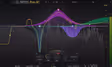
Pro-Q 4
1. Pro-Q 4 FabFilter
8.6
Type
Transparent digital EQ
Bands
Up to 24
Standout
Dynamic and mid-side per band
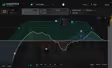
smart:EQ 4 8.3
Type
Assistive corrective EQ
Bands
Adaptive plus manual
Standout
Cross-channel clash resolution
Was $129Now $79 View price
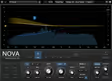
TDR Nova GE
3. TDR Nova GE Tokyo Dawn Labs
8.4
Type
Parallel dynamic EQ
Bands
4 plus 2 shelves
Standout
Per-band parallel blend
Type
Hybrid digital and analogue-modelled EQ
Bands
32
Standout
Swappable analogue curves per band
Type
Dynamic EQ
Bands
6 floating
Standout
Per-band sidechain input
Was $149Now $50 View price
Carve EQ
6. Carve EQ Kilohearts
7.6
Type
Graphic EQ with matching
Bands
31 fixed
Standout
Reference spectrum matching
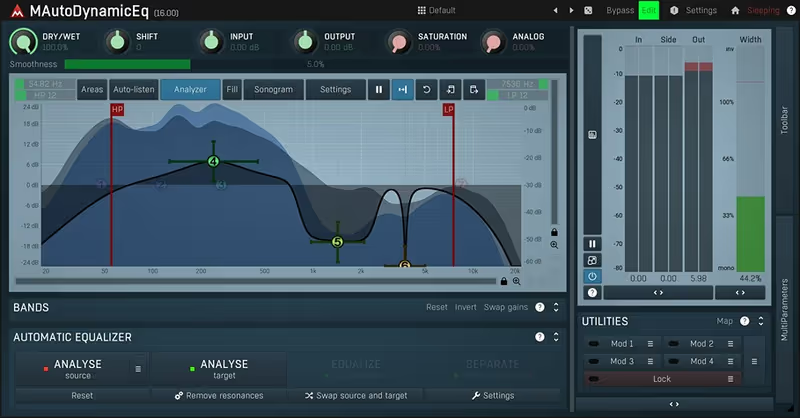
MAutoDynamicEQ
7. MAutoDynamicEQ MeldaProduction
8.1
Type
Dynamic EQ
Bands
Unlimited
Standout
Automatic gain compensation
Read more →

Methodology

Who is this for

Beat makers, sample-based producers, and electronic musicians who need reliable sounds and tools for finishing tracks fast.

Our testing process

We test every pack and plugin in actual beat sessions, from programming drum patterns to full arrangement and mixdown. We evaluate how tools perform in a dense mix, not in solo.

Why you should trust us

We buy most reviewed plugins ourselves. Occasionally we receive NFRs for evaluation, but this never guarantees a review or positive verdict. We may earn commissions from links, but our editorial choices are never for sale.

Also considered

For every category, we audition the top 8 to 15 options, discarding any that fail our usability test or deliver a low inspiration rate in a real session.

Top Picks

01 FabFilter

Pro-Q 4

Best for Everyday Mixing

The surgical and musical all-rounder with the fastest workflow on this list. Buy it first and stop shopping.

Tested score
8.6
out of 10

How it scored

  • Precision 9.5

    Narrow notches leave no audible hole.

  • Musicality 9.0

    Broad boosts stay natural, not brittle.

  • Workflow 9.5

    Sweep, find, fix in under ten seconds.

  • CPU load 6.5

    Natural phase mode is heavy at high band counts.

Why we picked it

Best for producers who want one EQ that handles surgical notching, broad tone shaping, dynamic bands, and mid-side work without ever needing a second plugin.

Who should skip it

Avoid if you want obvious analogue colour baked in, or if you are running a big session on an older laptop where the natural phase mode will cost you real CPU.

The good

  • Surgical precision with no audible artefacts
  • Every band can go dynamic or mid-side
  • Best visual feedback of any EQ here
  • Replaces three separate plugins

The bad

  • Heavy CPU in natural phase mode
  • No analogue colour of its own
  • Good visuals encourage pointless over-editing
Format
VST / AU / AAX
Type
Transparent digital EQ
Bands
Up to 24
Standout
Dynamic and mid-side per band
Platform
macOS / Windows
License
Perpetual
Price
$199
Why it scored that way

Pro-Q 4 is the EQ that most producers should buy once and never think about again. It is surgical when you need it and musical when you do not.

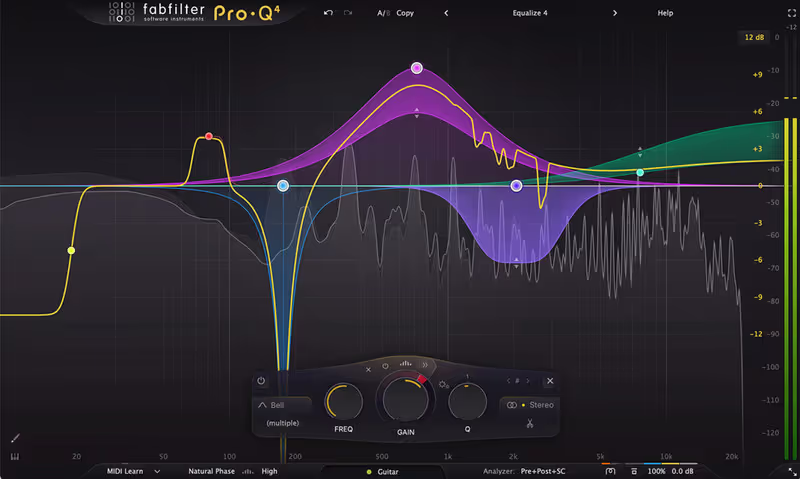
FabFilter's reputation rests on this plugin and it earns it in the first thirty seconds. I loaded it on the boxy piano sample, held a band and swept it until the 310Hz build-up jumped out, then pulled it down four decibels with a narrow Q. The mud vanished and nothing else about the sample changed, which is the whole test for a transparent EQ. The analyser sits behind the curve so you are looking at the problem and the fix in the same place, and the EQ Match function got a dull vocal sitting close to a reference in about a minute.

What makes it the best EQ plugin for everyday beat making is that it does not force you to choose between surgical and musical. Any band can be switched to dynamic, so the harsh 3kHz on a rap vocal only gets ducked when the rapper actually hits it. Any band can go mid-side, so you can clear the centre of a piano loop for the vocal while leaving the stereo edges full. Version 4 added better spectral display and a cleaner workflow for large band counts.

The friction is CPU. In natural phase mode with a lot of bands it is noticeably heavier than a simple EQ, and I have had to freeze tracks in big sessions on an older laptop. There is also a real risk of over-editing, because the visual feedback is so good that you start fixing things nobody would ever hear. At one hundred and ninety-nine dollars it is a serious purchase, but it replaces three other plugins and it is the one I open first on every mix.
Heard on
A default channel EQ across modern hip-hop mixes Referenced constantly in FabFilter mixing tutorials Widely used for mid-side vocal and sample clearing
Check price — $199
02 sonible

smart:EQ 4

Best for Corrective Mixing

The EQ that finds the problem for you, and the cross-channel grouping genuinely fixes low-mid clashes fast.

Tested score
8.3
out of 10

How it scored

  • Speed to result 9.5

    Usable corrective curve in under a minute.

  • Clash resolution 9.0

    Cross-channel grouping clears low mids automatically.

  • Precision 8.0

    Good, but a manual EQ still notches tighter.

  • Creative control 6.5

    Flattened brightness we wanted on hi-hats.

Why we picked it

Best for producers who write well but mix slowly and want a corrective EQ curve suggested in seconds, plus automatic clash resolution across a group of tracks.

Who should skip it

Avoid if you already mix confidently by ear, or if you want creative tone shaping, because the analysis chases spectral balance rather than the sound you are actually after.

The good

  • Generates a sensible curve in seconds
  • Cross-channel grouping fixes low-mid clashes
  • Big time saver on dense arrangements

The bad

  • Suggestions need pulling back by ear
  • Chases balance over creative intent
  • Discourages learning what the curve does
Format
VST / AU / AAX
Type
Assistive corrective EQ
Bands
Adaptive plus manual
Standout
Cross-channel clash resolution
Platform
macOS / Windows
License
Perpetual
Price
$79 (was $129)
Why it scored that way

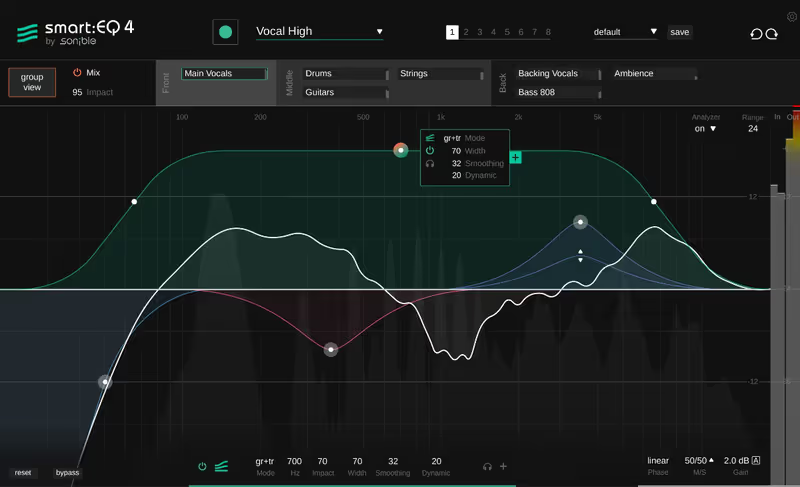
smart:EQ 4 listens to the track and proposes the curve. On a muddy sample it is unnervingly close to what you would have done yourself.

The pitch here is that you should not have to know where the problem is. I dropped smart:EQ 4 on the boxy piano loop, hit the learn button, played eight bars, and it drew a curve that cut 290Hz and 620Hz and gently lifted the top. That is broadly what I did by hand with Pro-Q 4, and it took a fifth of the time. For producers who are strong at writing and weak at mixing, that gap is the entire value of the plugin.

The genuinely clever feature is cross-channel processing. You group several tracks, and the plugin works out which one should own each frequency range, then ducks the others dynamically. I put the 808, the piano, and the vocal in a group and the low mids sorted themselves out without me drawing a single node. On a dense beat where four elements are all reaching for 250Hz, this does in one pass what usually takes twenty minutes of soloing and guessing.

The friction is that the suggestion is a starting point and not an answer. On the hi-hat loop it flattened some of the brightness I actually wanted, because it is chasing spectral balance rather than a creative intent, and I had to pull the curve back by about forty percent. It also encourages you not to learn what it is doing, which is fine until you need to mix something it handles badly. Treat it as a fast first pass rather than an autopilot and it is a strong buy at seventy-nine dollars.

Heard on
Popular with producers who mix their own releases Referenced in sonible assistive mixing demos Used for fast low-mid cleanup on dense arrangements
Check price — $79
03 Tokyo Dawn Labs

TDR Nova GE

Best for Budget Mixing

Dynamic EQ, de-esser, and multiband compressor in one, for nineteen dollars. The value pick of the list.

Tested score
8.4
out of 10

How it scored

  • Value 10.0

    Dynamic EQ quality at nineteen dollars.

  • Dynamic control 9.0

    Full threshold, ratio, attack, release per band.

  • Precision 8.5

    Clean cuts, though the analyser is basic.

  • Workflow 6.0

    Dense layout, small labels, slow to learn.

Why we picked it

Best for producers on a tight budget who need real dynamic EQ, per-band de-essing, and parallel processing without paying premium plugin prices.

Who should skip it

Avoid if you want a modern uncluttered interface or detailed spectral visuals, because the layout is dense and takes a week of use before it feels quick.

The good

  • Dynamic EQ quality far above the price
  • Per-band parallel blend softens hard cuts
  • Doubles as a precise de-esser
  • Light on CPU

The bad

  • Dense, dated interface
  • Basic analyser and no EQ matching
  • Steeper learning curve than the price suggests
Format
VST / AU / AAX
Type
Parallel dynamic EQ
Bands
4 plus 2 shelves
Standout
Per-band parallel blend
Platform
macOS / Windows
License
Perpetual
Price
$60
Why it scored that way

TDR Nova GE costs nineteen dollars and does dynamic EQ well enough that the price looks like a mistake.

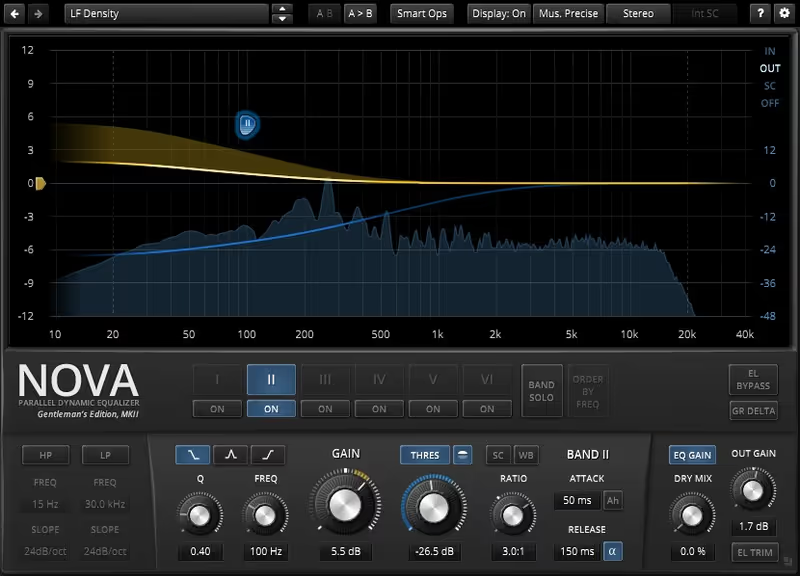
This is the value pick and it is not close. Nova GE gives you four fully dynamic bands with their own threshold, ratio, attack, and release, which means every band is effectively a multiband compressor you can aim at a single frequency. I used it on the rap vocal to duck 3.2kHz only on the harsh consonants, set a fast attack and a forty millisecond release, and the sibilance stopped without dulling the rest of the take. That is a de-esser, an EQ, and a multiband compressor in one window.

The parallel architecture is the part people miss. You can blend the processed signal against the dry one per band, so an aggressive cut becomes a gentle one without redrawing anything. On the 808 I notched 180Hz hard, then dialled the parallel mix back to sixty percent, which kept the weight while clearing room for the kick. Getting that result on a static EQ takes considerably more fiddling.

The friction is the interface. It is dense, the labels are small, and it looks like an engineering tool rather than a modern plugin, so finding the control you want takes longer than it should for the first week. There is no spectrum-matching, no mid-side per band in the way Pro-Q offers, and the analyser is basic. None of that matters much when the processing itself is this good for nineteen dollars, and it remains the best EQ plugin to recommend to someone who cannot justify two hundred.

Heard on
A long-standing recommendation on mixing forums Widely used as an affordable de-esser Common first dynamic EQ for bedroom producers
Check price — $60
04 Plugin Alliance

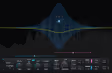
Three-Body Technology Kirchhoff-EQ

Best for Tone Shaping

Clean surgical EQ plus a rack of modelled vintage curves on any band. Two plugins for the price of one.

Tested score
8.6
out of 10

How it scored

  • Character 9.5

    Modelled curves make broad boosts musical.

  • Precision 9.0

    Thirty-two clean bands with dynamics.

  • Value 9.0

    Two plugins in one at sixty-one dollars.

  • Workflow 7.0

    Busy interface, slow curve auditioning.

Why we picked it

Best for producers who want surgical digital EQ and modelled analogue character in one plugin, especially for broad musical boosts on sampled material.

Who should skip it

Avoid if you want the fastest possible workflow or you run big sessions on limited CPU, because the analogue modelling across many bands gets heavy quickly.

The good

  • Analogue curves available on any band
  • Thirty-two bands with dynamics and mid-side
  • Broad boosts stay musical, not brittle

The bad

  • Heavy CPU with modelling active
  • Busier and slower than Pro-Q
  • Curve names mean nothing until auditioned
Format
VST / AU / AAX
Type
Hybrid digital and analogue-modelled EQ
Bands
32
Standout
Swappable analogue curves per band
Platform
macOS / Windows
License
Perpetual
Price
$149
Why it scored that way

Kirchhoff-EQ gives you a modern surgical EQ and a rack of modelled vintage curves in the same plugin.

The appeal here is that you get precision and character without switching plugins. Kirchhoff has thirty-two bands of clean digital EQ, and each band can be swapped to a modelled analogue curve from a long list of classic hardware. I boosted the piano sample by three decibels at 4kHz on a clean band, then switched the same band to one of the vintage models, and the boost went from correct to pleasant. The frequency was identical, the harmonic behaviour was not.

That matters more on beats than people admit. A lot of sample-based production needs broad musical lifts rather than surgical cuts, and a clean digital boost can sound brittle on an already-bright loop. Having the analogue curves available on the same band you were already using is faster than loading a separate colour box. The dynamic bands and mid-side options are there too, so it competes directly with Pro-Q on features.

The friction is complexity and CPU. Thirty-two bands with analogue modelling active is a heavy plugin, and the sheer number of options means the workflow is slower than FabFilter's. The interface is capable but busier, and choosing between the modelled curves involves a fair amount of trial and error because the names mean nothing until you have heard them. At sixty-one dollars through Plugin Alliance it is strong value for what is genuinely two plugins.

Heard on
Popular as a Pro-Q alternative with analogue options Used for musical boosts on sampled loops Referenced in Plugin Alliance EQ comparisons
Check price — $149
05 Waves

F6 Floating-Band Dynamic EQ

Best for Vocal Ducking

The dynamic specialist. Sidechain-keyed bands make one instrument move out of another's way automatically.

Tested score
8.1
out of 10

How it scored

  • Dynamic control 9.5

    Per-band sidechain is genuinely fast.

  • Vocal work 9.0

    Tames harshness without dulling quiet lines.

  • Versatility 6.5

    Six bands and a narrow remit.

  • Workflow 7.5

    Quick in use, dated interface and installer.

Why we picked it

Best for producers mixing rap and sung vocals who need frequency-specific ducking, sidechain-triggered EQ moves, and fast control of harshness that only appears sometimes.

Who should skip it

Avoid if you want a general-purpose tone-shaping EQ, or if you would rather not deal with the Waves installer and licence manager for a single plugin.

The good

  • Per-band sidechain ducking is very fast
  • Excellent on inconsistent vocal harshness
  • Mid-side mode clears centres on loops

The bad

  • Narrow remit, not a general tone shaper
  • Only six bands
  • Waves installer and licensing overhead
Format
VST / AU / AAX
Type
Dynamic EQ
Bands
6 floating
Standout
Per-band sidechain input
Platform
macOS / Windows
License
Perpetual
Price
$50 (was $149)
Why it scored that way

The F6 is a specialist. When one frequency only misbehaves sometimes, this is the fastest way to deal with it.

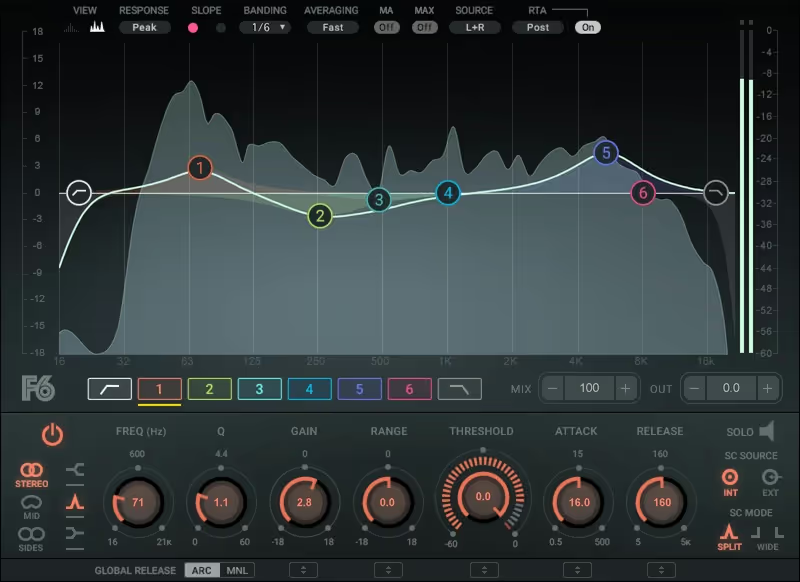
Waves built the F6 around one job and it does that job quickly. Six floating bands, each with its own threshold, range, attack, and release, plus a sidechain input per band. I used the sidechain on the piano loop keyed from the vocal, set a band at 500Hz, and the piano stepped back out of the way every time the rapper came in and returned during the gaps. That is automatic frequency-specific ducking, and doing it manually with automation would take most of an afternoon.

On the harsh vocal it was equally fast. A band at 3kHz with a two decibel range and a quick release tamed the shouty moments without touching the quiet lines, which is exactly the case where a static cut ruins a performance. The mid-side mode is useful on sampled loops, letting you clear the centre while keeping the width, and the analyser is clear enough to work from.

The friction is that it only does this. It is not a general-purpose tone shaper, the six bands run out faster than you expect on a complex source, and the interface follows the older Waves design language that has aged. The bigger practical annoyance is the Waves licensing and installer system, which is more involved than a simple download for most of the other plugins here. Priced at one hundred and forty-nine dollars it is worth it if you mix vocals regularly, and less compelling if you do not.

Heard on
A standard dynamic EQ in commercial vocal chains Used for sidechain-keyed frequency ducking Referenced in Waves mixing tutorials
Check price — $50
06 Kilohearts

Carve EQ

Best for Reference Matching

A drawing-based graphic EQ with the fastest spectrum matching here. A shaping tool, not a corrective one.

Tested score
7.6
out of 10

How it scored

  • Spectrum matching 9.0

    Gets close to a reference in one pass.

  • Broad shaping 8.5

    One gesture beats placing four nodes.

  • Precision 6.0

    Fixed bands cannot notch narrow resonances.

  • Value 7.0

    No dynamic bands at seventy-nine dollars.

Why we picked it

Best for producers who shape broad tonal character on sampled loops and want fast spectrum matching against a reference in a drawing-based workflow.

Who should skip it

Avoid if you need narrow surgical notches or dynamic bands, because fixed graphic bands cannot target a single ringing resonance precisely.

The good

  • Spectrum matching is fast and effective
  • Drawing workflow suits broad tone shaping
  • Works as a Kilohearts Snapin module

The bad

  • Cannot notch narrow resonances
  • No dynamic bands
  • Priced above rivals that offer more
Format
VST / AU / AAX
Type
Graphic EQ with matching
Bands
31 fixed
Standout
Reference spectrum matching
Platform
macOS / Windows
License
Perpetual
Price
$79
Why it scored that way

Carve EQ is a graphic EQ built for drawing shapes rather than placing nodes, and it matches spectra faster than anything else here.

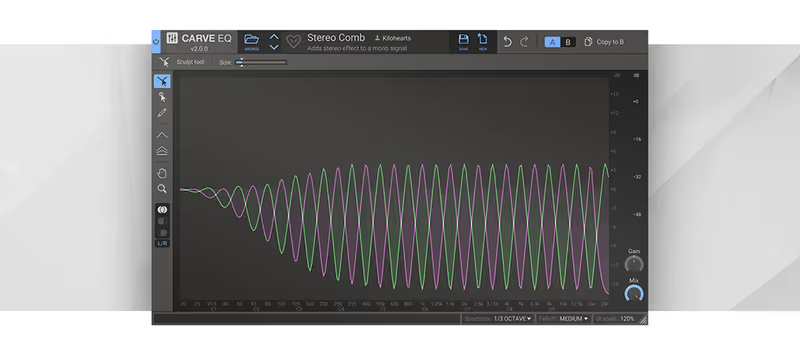
Most EQs make you place bands. Carve gives you thirty-one fixed bands and lets you draw across them with the mouse, which sounds crude and turns out to be quick for broad tonal work. I dragged a gentle smile curve across the hi-hat loop in one gesture and got a usable result faster than placing four separate nodes. For shaping the overall character of a sampled loop rather than fixing a specific problem, the drawing workflow genuinely suits the task.

The spectrum matching is the standout. I loaded a reference drum bus, let Carve analyse it, and applied the match to my own drums at fifty percent. The low mids tightened up and the top end came forward, and it got me close enough that the remaining work was small. Combined with the Kilohearts Snapin system, where Carve can sit inside a Multipass or a Snap Heap alongside other modules, it is more flexible than the plain graphic EQ format suggests.

The friction is precision. Thirty-one fixed bands cannot notch a narrow resonance the way a parametric can, so a ringing 310Hz needs a different plugin. There are no dynamic bands either, which is a real gap at seventy-nine dollars when TDR Nova GE offers them for nineteen. It is a tone-shaping and matching tool rather than a corrective one, and it works best alongside a parametric EQ instead of replacing it.

Heard on
Used for matching drum busses to references Popular inside Kilohearts Snapin chains Referenced in Kilohearts workflow demos
Check price — $79
07 MeldaProduction

MAutoDynamicEQ

Best for Technical Mixing

The deepest dynamic EQ here, with per-band sidechain and gain compensation. Powerful, and awkward to drive.

Tested score
8.1
out of 10

How it scored

  • Depth 9.5

    Modulation and sidechain beyond any rival here.

  • Value 9.0

    Serious capability at forty-five dollars.

  • Precision 8.5

    Adjustable band shapes cut cleanly.

  • Workflow 5.5

    Small controls and an unconventional layout.

Why we picked it

Best for technical producers who want per-band sidechaining, automatic gain compensation, and modulation depth, and who do not mind a demanding interface.

Who should skip it

Avoid if you want a fast intuitive workflow or clear visual feedback, because the layout is unconventional and the depth actively slows down simple tasks.

The good

  • Per-band sidechain and deep modulation
  • Gain compensation stops loudness bias
  • Strong value for the capability

The bad

  • Awkward, cramped interface
  • Steep learning curve
  • Weaker visual feedback than rivals
Format
VST / AU / AAX
Type
Dynamic EQ
Bands
Unlimited
Standout
Automatic gain compensation
Platform
macOS / Windows
License
Perpetual
Price
$109
Why it scored that way

MAutoDynamicEQ is deep to the point of being intimidating, and it will do things no other EQ on this list can.

MeldaProduction plugins are built for people who want every parameter exposed, and this one is no exception. Beneath a slightly awkward interface there is a dynamic EQ with per-band sidechaining, adjustable band shapes, mid-side and surround handling, and automatic gain compensation that keeps the perceived level steady while you work. That last feature matters more than it sounds, because it stops you from being fooled into thinking a boost is an improvement when it is only louder.

I used it on the 808 and kick clash with a sidechained band at 60Hz keyed from the kick, so the 808 dipped a decibel and a half only on the kick hits. The low end stopped flapping and the 808 kept its sustain everywhere else. The modulation options go further than any competitor here, letting parameters move over time, which is genuinely useful on long evolving samples and completely unnecessary on a hi-hat.

The friction is the interface and the learning curve, and both are significant. Controls are small, the layout is unconventional, and finding a feature you know exists can take a few minutes. The visual feedback is worse than Pro-Q's despite the plugin arguably being more capable, and the sheer depth means most producers will use ten percent of it. At forty-five dollars it is very good value for anyone willing to spend the time, and frustrating for anyone who is not.

Heard on
Popular with technically minded mix engineers Used for sidechained low-end control Referenced in MeldaProduction dynamics tutorials
Check price — $109

What didn’t make the list

3 cut
  • Oxford EQ Sonnox

    A genuinely excellent console-style EQ, but at two hundred and seventy dollars it asks mastering money for a job Pro-Q 4 does with more flexibility.

  • Scheps 73 Waves

    A lovely Neve 1073 emulation for broad musical tone, but it is a colour box with fixed frequencies rather than the everyday problem-solver this list needed.

  • MEqualizerLP MeldaProduction

    Free-tier value and entirely usable, but the interface slows you down enough that we picked the more capable MAutoDynamicEQ from the same developer.

Frequently Asked Questions

Should I cut or boost when mixing a beat?

Cut first. Removing the frequencies that are causing a clash leaves headroom and keeps the mix from getting louder with every move. Boost only when a sound genuinely lacks something, and use a wide gentle curve when you do.

What EQ moves fix a muddy beat?

A cut somewhere between 200Hz and 400Hz on pads, piano, and vocals clears most mud, because that range stacks up fast when several parts share it. High-pass anything that is not the kick or the 808 so the low end belongs to two elements only.

Do I need a dynamic EQ?

Not to start, but it solves problems a static EQ cannot. When a vocal is only harsh on certain words, a dynamic band ducks that frequency when it spikes and leaves the rest of the take untouched, which is far less damaging than a permanent cut.

Is an expensive EQ plugin actually better than a stock one?

The maths behind a clean digital EQ is well understood, so a stock EQ can do most surgical work. What you pay for is workflow speed, better visual feedback, dynamic bands, and analogue modelling. Those save real time, but they will not rescue a badly arranged beat.

Written By

Louis Raveton

Louis makes Downtempo, Electro-Dub, and beat-driven music under the names Flagada and Monsieur Shwill. He treats his sample drive like a record collection and has been obsessively hunting textures, breaks, and weird synth patches for over a decade. He also composes for Canal+ animation and LVMH installations, which means he has tested tools under real deadline pressure.