


Best Delay Plugins for Producers (2026)

Reverb puts a sound in a room. Delay puts it in time, which is why a single dotted eighth repeat can make a sparse beat feel full without adding a single new element.

We buy most of what we test. When you buy through a link on this page we may earn a commission, which never affects our picks or verdicts. How we work.

Louis Raveton
By Louis Raveton

Louis makes Downtempo, Electro-Dub, and beat-driven music under the names Flagada and Monsieur Shwill. He treats his sample drive like a record collection and has been obsessively hunting textures, breaks, and weird synth patches for over a decade. He also composes for Canal+ animation and LVMH installations, which means he has tested tools under real deadline pressure.

Delay is the cheapest way to make a sparse beat sound full. A single melodic phrase with a dotted eighth repeat becomes a pattern, a rap ad-lib with a quarter-note throw becomes an arrangement moment, and a snare with a short slap gains width without a stereo widener flattening the mix. It does all of this without adding a new element, which matters when the arrangement is already crowded.

We tested each of these on the same four sources. A rap vocal for throws, a melodic pluck for width, a snare for short rhythmic slaps, and a full beat bus for general ambience. We judged how the repeats changed character as they decayed, whether tempo sync behaved sensibly when we changed note divisions mid-playback, how quickly each plugin cluttered a busy arrangement, and how far the modulation could be pushed before the result stopped being musical.

The split here is between character boxes that colour every repeat and precise tools that give you exactly what you dial in. Most producers want one of each, and pairing a delay with the right reverb matters more than either choice alone. If your repeats are muddying the low end, filtering the delay return fixes that faster than reaching for a different plugin.

Pick one in 10 seconds

Short version
  • You want one delay with every classic character in it Thirty machine models under one interface EchoBoy
  • You want precise, modern, deeply modulatable delay The most controllable delay on this list Timeless 3
  • You want authentic tape echo with real wow and flutter A modelled Space Echo, transport and all Delay TAPE-201
  • You want fast vocal throws with no menu diving Two knobs and a sync button, done H-Delay Hybrid Delay
  • You are on a budget and want creative repeats Granular-leaning delay for under thirty dollars Cluster Delay

Compare all 7

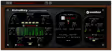
EchoBoy
1. EchoBoy Soundtoys
8.8
Type
Multi-model delay
Character
Varies by model
Best on
Vocals and melodies
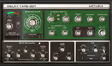
Timeless 3
2. Timeless 3 FabFilter
8.6
Type
Modulated digital delay
Character
Neutral and clean
Best on
Synths and vocals
Type
Tape delay emulation
Character
Warm and unstable
Best on
Melodies and dub effects
Type
Hybrid digital and analogue delay
Character
Slightly dirty
Best on
Rap vocals
Was $149Now $40 View price
Replika XT
5. Replika XT Native Instruments
8.5
Type
Multi-mode delay
Character
Clean to diffuse
Best on
Beat bus and synths
Echorec
6. Echorec Pulsar Audio
8.4
Type
Magnetic drum delay emulation
Character
Bright and metallic
Best on
Melodies and snares
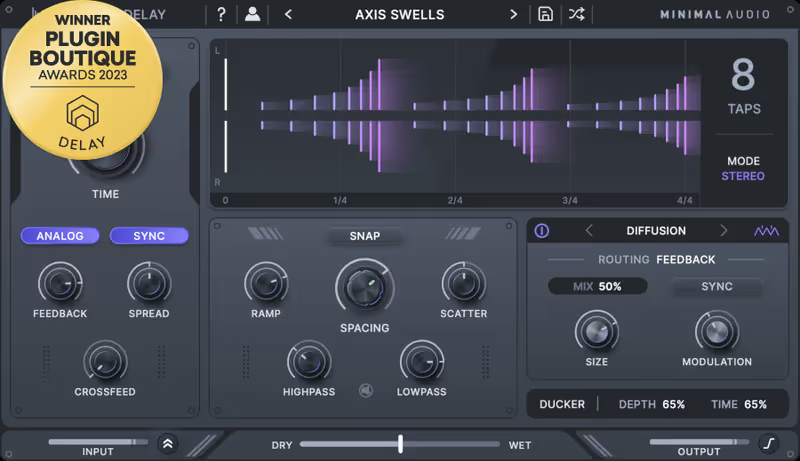
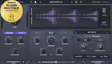
Cluster Delay
7. Cluster Delay Minimal Audio
7.8
Type
Granular cluster delay
Character
Scattered and diffuse
Best on
Textures and transitions
Read more →

Methodology

Who is this for

Beat makers, sample-based producers, and electronic musicians who need reliable sounds and tools for finishing tracks fast.

Our testing process

We test every pack and plugin in actual beat sessions, from programming drum patterns to full arrangement and mixdown. We evaluate how tools perform in a dense mix, not in solo.

Why you should trust us

We buy most reviewed plugins ourselves. Occasionally we receive NFRs for evaluation, but this never guarantees a review or positive verdict. We may earn commissions from links, but our editorial choices are never for sale.

Also considered

For every category, we audition the top 8 to 15 options, discarding any that fail our usability test or deliver a low inspiration rate in a real session.

Top Picks

01 Soundtoys

EchoBoy

Best for Everyday Delay

Thirty delay machines and a groove engine. The studio default, and most people use a fraction of it.

Tested score
8.8
out of 10

How it scored

  • Character range 10.0

    Thirty models that genuinely differ.

  • Groove engine 9.5

    Repeats can swing independently of the grid.

  • Repeat quality 9.0

    Tape models darken naturally as they decay.

  • Interface clarity 6.5

    Real depth hidden behind a details page.

Why we picked it

Best for producers who want thirty distinct delay characters in one plugin, plus a groove engine that lets repeats swing independently of the DAW grid.

Who should skip it

Avoid if you want everything visible at once, because most of the real control sits behind a details page that is easy to never open.

The good

  • Thirty models cover every classic character
  • Groove engine adds human feel to repeats
  • Tape models darken repeats naturally
  • Saturation and diffusion built in

The bad

  • Most controls hidden behind a details page
  • Involved installer and authorisation
  • Easy to use on defaults for years
Type
Multi-model delay
Character
Varies by model
Best on
Vocals and melodies
Format
VST / AU / AAX
Platform
macOS / Windows
License
Perpetual
Price
$199
Why it scored that way

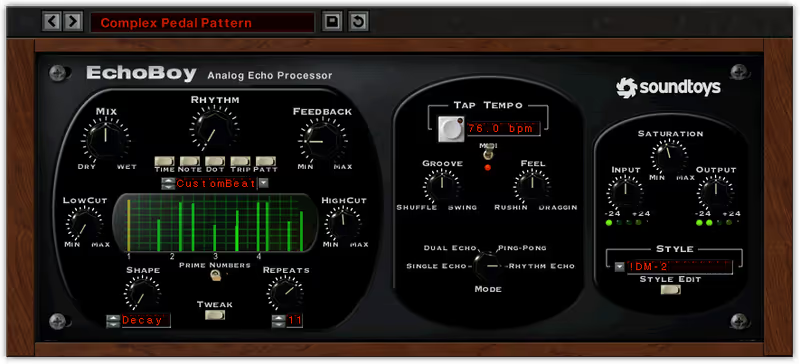
EchoBoy contains thirty delay machines and a groove engine, and it has been the studio default for over a decade for good reason.

The machine models are the reason to buy it. Each one applies a different filtering, saturation, and modulation profile to the repeats, so switching from the clean digital style to a tape or an old transistor model changes the entire character without touching another control. On the rap vocal I used a tape model for the throws and the repeats darkened progressively as they decayed, which kept them out of the way of the next line in a way a clean digital repeat does not.

The groove section is the feature nobody talks about and everybody should. It lets you apply a swing feel to the repeats independently of the DAW grid, so a delay on a straight snare can land slightly behind the beat and add a human push to a rigid pattern. On the melodic pluck a small amount of groove made the repeats feel played rather than generated, which is a subtle thing that changes how a whole beat sits.

The friction is that depth is hidden. The main panel is simple, and most of the real control lives behind a details page that many users never open, which means people run EchoBoy for years on defaults and miss most of what they bought. The Soundtoys installer and iLok-style authorisation are also more involved than a plain download. At sixty-nine dollars it is fairly priced and it is the delay I would recommend to someone buying their first serious one.
Heard on
A long-standing studio default for vocal throws Widely used across hip-hop and electronic production Referenced constantly in Soundtoys demonstrations
Check price — $199
02 FabFilter

Timeless 3

Best for Designed Delay

The most controllable delay here, with modulation on nearly everything. Neutral by design, expensive by price.

Tested score
8.6
out of 10

How it scored

  • Modulation depth 10.0

    Drag any modulator onto nearly any parameter.

  • Precision 9.5

    Clean division changes with no glitching.

  • Dynamic ducking 9.5

    Repeats step back while the vocal speaks.

  • Built-in character 5.5

    Deliberately neutral, colour must be built.

Why we picked it

Best for producers who build effects rather than choose them and want deep modulation, per-tap filtering, and dynamic ducking on the delay repeats.

Who should skip it

Avoid if you want instant vintage character, because Timeless is deliberately neutral and any colour has to be constructed by hand.

The good

  • Deepest modulation system of any delay here
  • Per-tap filtering across multiple delay lines
  • Dynamic ducking keeps vocals clear
  • Clean division changes during playback

The bad

  • No character of its own
  • Most expensive plugin on this list
  • Depth is wasted if you want simple repeats
Type
Modulated digital delay
Character
Neutral and clean
Best on
Synths and vocals
Format
VST / AU / AAX
Platform
macOS / Windows
License
Perpetual
Price
$149
Why it scored that way

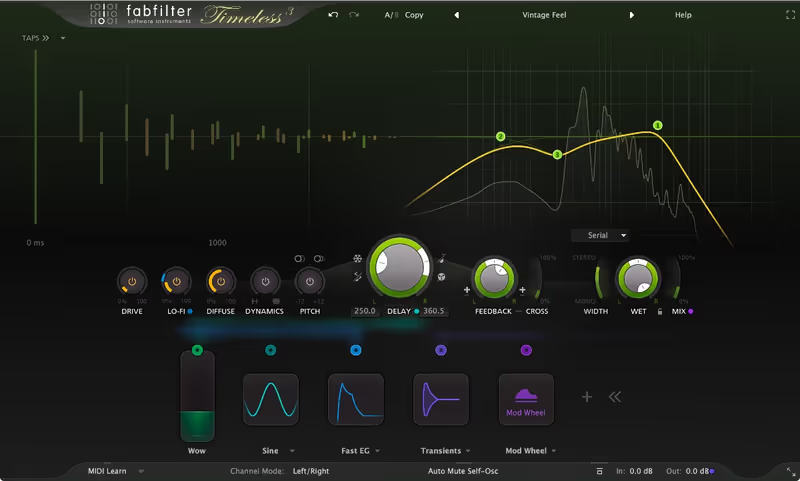
Timeless 3 is the delay for people who want to build the effect rather than choose it. Nothing here is preset character.

The modulation system is the whole plugin. You drag envelope followers, LFOs, and XLFOs onto nearly any parameter, so the filter on the repeats can open with the input level, the delay time can drift slowly, and the feedback can duck when the vocal is present. On the rap vocal I set an envelope follower to reduce the delay level while the rapper was speaking and restore it in the gaps, which meant throws filled the space without ever competing with the words.

Per-tap filtering and the multi-line architecture give control that character boxes cannot. I built a delay with a short bright repeat on one line and a long dark one on another, at different note divisions, and the melodic pluck gained both width and depth from a single plugin instance. The interface is FabFilter's usual standard, so the modulation routing is visible rather than buried, and changing note divisions during playback did not glitch.

The friction is the absence of character. Timeless will do anything you ask and has no opinion of its own, so if you want a Space Echo you have to build one, and it will still sound cleaner than a modelled one. That neutrality is exactly right for some producers and unsatisfying for others. At one hundred and forty-nine dollars it is the most expensive here, which is hard to justify unless you actually use the modulation depth you are paying for.

Heard on
Used for complex modulated delay in electronic music Popular for ducking delays under vocals Referenced in FabFilter modulation tutorials
Check price — $149
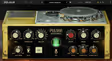
03 Arturia

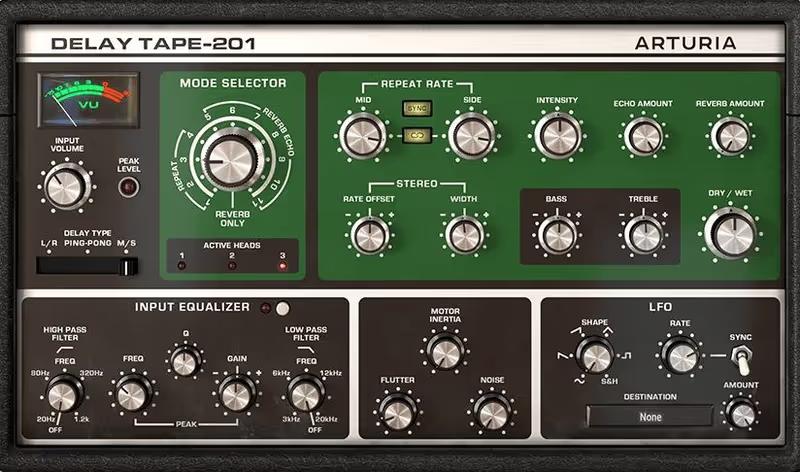
Delay TAPE-201

Best for Tape Echo

A properly modelled Space Echo with three heads and real tape drift. Character over precision.

Tested score
8.3
out of 10

How it scored

  • Tape authenticity 9.5

    Transport modelling produces real pitch drift.

  • Multi-head patterns 9.5

    Head combinations create rhythms from one time.

  • Spring reverb 8.5

    Modelled well enough to use on its own.

  • Grid precision 5.5

    Tape character means timing is never rigid.

Why we picked it

Best for producers who want authentic tape echo with genuine pitch drift, progressive high-frequency loss, and the multi-head rhythmic patterns of a Space Echo.

Who should skip it

Avoid if you need delay locked rigidly to the grid, because the modelled tape transport makes timing slightly inconsistent by design.

The good

  • Genuine tape transport modelling
  • Three-head system creates rhythmic variety
  • Modelled spring reverb is a real bonus

The bad

  • Timing is never rigidly locked to the grid
  • Small hardware-style controls
  • Character tool rather than a workhorse
Type
Tape delay emulation
Character
Warm and unstable
Best on
Melodies and dub effects
Format
VST / AU / AAX
Platform
macOS / Windows
License
Perpetual
Price
$99
Why it scored that way

This models a Space Echo properly, including the transport, so the repeats wobble and degrade the way real tape does.

Tape delay sounds different from digital delay for reasons that go beyond filtering. The tape moves at a slightly inconsistent speed, so each repeat is fractionally pitch-shifted relative to the last, and the tape saturates and loses high end progressively. Arturia modelled the transport rather than approximating the result, and on the melodic pluck the repeats drifted in pitch in a way that made them sound like a physical process rather than a digital copy.

The three-head system is what gives the Space Echo its character. Different combinations of heads produce different rhythmic patterns from a single delay time, so switching head configurations changes the rhythm of the repeats without changing the tempo setting. On the snare I used a two-head combination and got a syncopated slap pattern that would have needed two delay instances to build otherwise. The spring reverb is modelled too and is genuinely useful on its own.

The friction is that authenticity includes the limitations. Sync to DAW tempo works but the tape character means timing is never entirely rigid, which is charming on melodies and a problem when you need a delay locked exactly to the grid. The interface is a faithful hardware reproduction with small controls and no visual feedback. At ninety-nine dollars it is fair for the modelling quality, and it is a character purchase rather than a workhorse.

Heard on
Modelled on the Roland Space Echo hardware Used for dub-style delay in electronic production Referenced in Arturia vintage effect demonstrations
Check price — $99
04 Waves

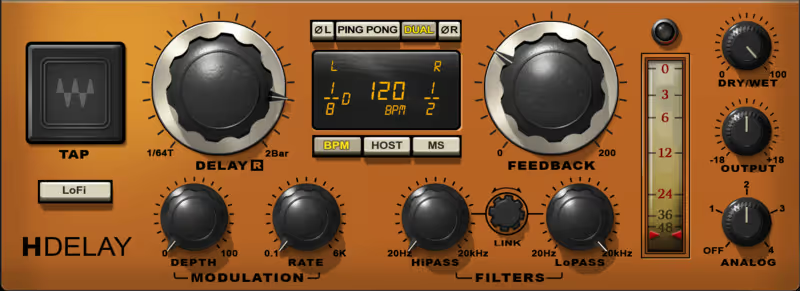
H-Delay Hybrid Delay

Best for Vocal Throws

The fast, simple vocal throw delay. Almost no depth, and rarely worth its list price.

Tested score
6.8
out of 10

How it scored

  • Speed to result 9.5

    Usable vocal throw in fifteen seconds.

  • Repeat placement 9.0

    LoFi switch pushes repeats behind the source.

  • Depth 4.5

    No modulation, taps, or multiple lines.

  • Value at list 4.0

    Only sensible during a Waves sale.

Why we picked it

Best for producers who want fast vocal throws and simple rhythmic delays with enough analogue colour that the repeats sit behind the source automatically.

Who should skip it

Avoid if you need modulation or multiple delay lines, and be aware that list price is poor value outside the frequent Waves sales.

The good

  • Fastest workflow for a basic vocal throw
  • LoFi switch places repeats behind the source
  • Well-implemented ping-pong width

The bad

  • No modulation or per-tap control
  • Dated interface with small controls
  • Waves installer overhead for a simple tool
Type
Hybrid digital and analogue delay
Character
Slightly dirty
Best on
Rap vocals
Format
VST / AU / AAX
Platform
macOS / Windows
License
Perpetual
Price
$40 (was $149)
Why it scored that way

H-Delay does the everyday job with almost no thinking required, which is why it turns up on so many commercial vocal chains.

Speed is the argument. You load it, hit sync, pick a division, set feedback, and you have a vocal throw. On the rap vocal I had a usable quarter-note throw configured in about fifteen seconds, and the analogue modelling meant the repeats had enough colour to sit behind the dry vocal without extra filtering. For a producer who wants the effect rather than the process, that is exactly right.

The LoFi switch is more useful than its name suggests. It degrades the repeats in a way that pushes them further back in the mix, which solves the common problem of delay repeats competing with the source. Combined with the analogue noise emulation it gives the plugin a slightly dirty quality that flatters rap vocals in particular. Ping-pong mode is well implemented and produces genuine width from a mono source.

The friction is the ceiling and the ecosystem. There is no modulation to speak of, no per-tap control, and no multiple delay lines, so anything beyond a straightforward repeat needs a different plugin. The interface follows older Waves conventions with small controls and dated styling. The bigger issue for many people is the Waves installer and licence manager, which is a lot of overhead for one simple delay. At one hundred and forty-nine dollars list it is poor value, though it is very frequently discounted to a fraction of that.

Heard on
A common delay in commercial vocal chains Widely used for quick rhythmic throws Referenced in Waves mixing tutorials
Check price — $40
05 Native Instruments

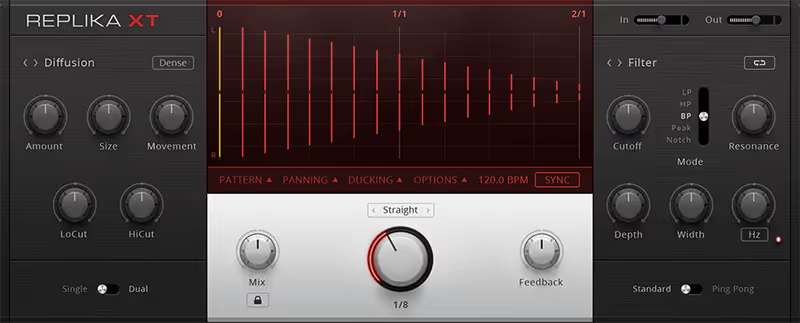
Replika XT

Best for Varied Delay

Five distinct delay types with a standout diffusion mode. Capable middle ground, with installer overhead.

Tested score
8.5
out of 10

How it scored

  • Mode variety 9.0

    Five modes that behave genuinely differently.

  • Diffusion mode 9.5

    Fills space without reading as an effect.

  • Pitch shifting 9.0

    Shifted feedback creates ascending tails.

  • Workflow 6.5

    Settings do not carry when switching modes.

Why we picked it

Best for producers who want five genuinely different delay types in one plugin, including a diffusion mode that blurs the line between delay and reverb.

Who should skip it

Avoid if you would rather not run the Native Access installer, and note that switching modes does not carry your settings across.

The good

  • Five genuinely distinct delay modes
  • Diffusion mode fills space invisibly
  • Pitch shifting in the feedback loop

The bad

  • Requires the Native Access installer
  • Settings lost when switching modes
  • Middle ground between character and control
Type
Multi-mode delay
Character
Clean to diffuse
Best on
Beat bus and synths
Format
VST / AU / AAX
Platform
macOS / Windows
License
Perpetual
Price
$65
Why it scored that way

Replika XT covers five distinct delay types in one plugin, and the diffusion mode is the one that sets it apart.

The mode selection is genuinely varied rather than five flavours of the same thing. Modern gives clean digital repeats, vintage digital gives early-sampler grit, analogue and tape cover the warmer ground, and diffusion smears the repeats into something closer to reverb. On the full beat bus the diffusion mode added a sense of space that was neither obviously delay nor obviously reverb, which filled the gaps in a sparse arrangement without any identifiable effect.

The pitch shifting inside the feedback loop is the creative highlight. Setting a small upward shift meant each repeat climbed slightly, producing a shimmering ascending tail on the melodic pluck that worked as an arrangement transition. The modulation section is capable without being as deep as Timeless, and the filtering per mode is sensibly implemented so repeats can be darkened as they decay.

The friction is that Native Instruments software brings the Native Access installer and account requirement, which is more overhead than a standalone plugin. The interface is clear but the mode switching means settings do not always translate when you change type, so auditioning modes loses your work. It also sits in an awkward middle ground, less characterful than EchoBoy and less controllable than Timeless. At sixty-five dollars it is fair value, particularly if you already run other NI software.

Heard on
Used for diffusion-style ambience in electronic music Popular within Native Instruments based setups Referenced in NI effect processing demonstrations
Check price — $65
06 Pulsar Audio

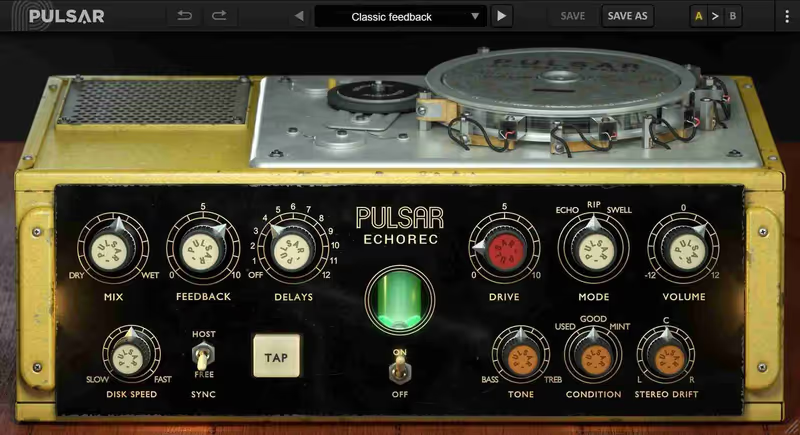
Echorec

Best for Drum Echo

Magnetic drum echo with repeats that stay bright. Distinctive and narrow, and cheap for the modelling.

Tested score
8.4
out of 10

How it scored

  • Repeat clarity 9.5

    Articulate through six iterations.

  • Multi-head rhythms 9.0

    Head combinations build played-sounding patterns.

  • Modelling detail 9.0

    Includes mechanical drum noise.

  • Mix friendliness 6.0

    Bright repeats clutter busy arrangements.

Why we picked it

Best for producers who want bright, articulate, metallic repeats that stay clear as they decay, with multi-head rhythmic patterns from a drum echo.

Who should skip it

Avoid as your only delay, because bright repeats clutter busy arrangements and the plugin does one specific vintage sound and nothing else.

The good

  • Repeats stay articulate as they decay
  • Four-head system builds complex rhythms
  • Detailed modelling at a fair price

The bad

  • Bright repeats clutter dense mixes
  • Very narrow stylistic range
  • Poor choice as a first delay
Type
Magnetic drum delay emulation
Character
Bright and metallic
Best on
Melodies and snares
Format
VST / AU / AAX
Platform
macOS / Windows
License
Perpetual
Price
$99
Why it scored that way

The Echorec used a magnetic drum rather than tape, and the repeats have a metallic clarity that no tape delay produces.

This is a different mechanism entirely and it sounds like it. A magnetic drum is more stable than tape, so the repeats do not drift in pitch, but the recording medium imparts a bright, slightly metallic quality that stays present as the repeats decay rather than darkening. On the melodic pluck the repeats remained clear and articulate through five or six iterations, which tape delays cannot do because they lose high end each pass.

The four-head system is the same idea as the Space Echo but produces different rhythms, and combining heads gives complex patterns from one delay time. On the snare I used three heads together and got a rolling rhythmic figure that sounded like a played pattern. Pulsar's modelling is detailed, including the drum's slight mechanical noise, and the plugin has a genuine sense of being a physical device.

The friction is that clarity is not always what you want. Delay repeats that stay bright can clutter a busy arrangement quickly, and on the full beat bus it competed with the source in a way that a darkening tape delay does not. It is also a narrow tool, doing one specific vintage sound extremely well and nothing else. At thirty-nine dollars it is very good value for the modelling quality, and it is a second or third delay rather than a first.

Heard on
Modelled on the Binson Echorec hardware Used for bright articulate vintage repeats Referenced in Pulsar Audio modelling demonstrations
Check price — $99
07 Minimal Audio

Cluster Delay

Best for Creative Texture

Granular scattered repeats and reverse tails for under thirty dollars. A texture tool, not a delay workhorse.

Tested score
7.8
out of 10

How it scored

  • Texture creation 9.5

    One note becomes a stereo cloud.

  • Value 9.0

    Creative delay under thirty dollars.

  • Reverse mode 8.5

    Swelling tails work well on transitions.

  • Conventional use 4.0

    Handles a clean vocal throw badly.

Why we picked it

Best for producers who want scattered granular-style repeat clouds, reversed tails, and randomised pitch and pan for textures and arrangement transitions.

Who should skip it

Avoid if you want a conventional rhythmic delay, because the architecture scatters repeats and handles clean vocal throws badly.

The good

  • Turns single notes into stereo clouds
  • Reverse mode creates useful swelling tails
  • Per-repeat filtering controls low-end buildup
  • Inexpensive for what it does

The bad

  • Poor at conventional rhythmic delay
  • Unpredictable parameter interactions
  • Sits unused between sessions
Type
Granular cluster delay
Character
Scattered and diffuse
Best on
Textures and transitions
Format
VST / AU / AAX
Platform
macOS / Windows
License
Perpetual
Price
$49
Why it scored that way

Cluster Delay scatters repeats rather than lining them up, which makes it useless for a vocal throw and excellent for texture.

Conventional delay produces evenly spaced repeats. This one produces clusters, randomising the timing, pitch, and pan of each repeat within ranges you set, so a single note becomes a scattered cloud rather than a rhythmic echo. On the melodic pluck I set a moderate cluster amount and the result was a shimmering texture that filled the stereo field, which would have taken a granular plugin and several minutes to build otherwise.

The reverse mode is the other useful trick, playing repeats backwards so a plucked note produces swelling tails that arrive before the next hit. Used sparingly on a transition it works well, and combined with the pitch randomisation it produces material that sounds designed rather than processed. Filtering per repeat keeps the clusters from building up in the low end, which matters because randomised repeats accumulate fast.

The friction is that it is not a general-purpose delay. Ask it for a clean dotted eighth on a vocal and it will do it badly, because the whole architecture is built around scattering rather than precision. It is a texture and transition tool, which means it will sit unopened for weeks. The interface is clean but the parameter interactions are unpredictable enough that finding a specific result involves a lot of trial and error. At around twenty-five dollars it is cheap enough that occasional use is easy to justify.

Heard on
Used for granular texture in electronic production Popular for arrangement transitions and swells Referenced in Minimal Audio creative effect demos
Check price — $49

What didn’t make the list

3 cut
  • Kaleidoscopes Waves

    A genuinely interesting creative delay with strong modulation, but it is a sound design box rather than an everyday tool and overlaps with what Timeless already does better.

  • MTurboDelay MeldaProduction

    Enormous range and fair value, but the MeldaProduction interface makes finding a usable setting slower than any other plugin we tested for this list.

  • Objeq Delay Applied Acoustics Systems

    A clever physical modelling delay that shapes repeats through resonant objects, though it is far too specialised to recommend before a producer owns a standard delay.

Frequently Asked Questions

What delay time should I use on a beat?

A dotted eighth is the standard for melodic width because the repeats fall between the main hits rather than on top of them. A quarter note suits vocal throws, and a short slap of around eighty milliseconds adds width to a snare without being heard as a separate repeat.

How do I stop delay from muddying my mix?

High-pass the delay return at around 300Hz so the repeats carry no low end, and low-pass it around 6kHz so they sit behind the dry signal. Using a send rather than an insert lets you filter the repeats without touching the source, which is almost always the better setup.

Should delay go before or after reverb?

Delay first, then reverb, is the usual order, because it puts the repeats in the same space as the source and sounds natural. Reverb into delay produces a smeared, washed effect that is useful creatively but rarely what you want for a clean vocal throw.

What is ping-pong delay?

A delay where consecutive repeats alternate between the left and right channels, which creates width and movement from a mono source. It works well on melodic elements and ad-libs, and it is usually a poor choice on anything that needs to stay centred, like a lead vocal or a kick.

Written By

Louis Raveton

Louis makes Downtempo, Electro-Dub, and beat-driven music under the names Flagada and Monsieur Shwill. He treats his sample drive like a record collection and has been obsessively hunting textures, breaks, and weird synth patches for over a decade. He also composes for Canal+ animation and LVMH installations, which means he has tested tools under real deadline pressure.