
Do This Now
- 1 Sounds runs USD 12.99 a month billed yearly for about 100 downloads a month. Creator runs USD 19.99 a month at the regular rate for about 200, with a USD 4.99 first month.
- 2 A credit gets you one sample. One loop, one kick, one vocal. Not a pack, not a folder.
- 3 INSTRUMENT is USD 12.99 a month billed yearly, and its presets do not cost credits at all.
- 4 Splice names a Creator+ plan but publishes no price and no download count for it, so nobody can honestly tell you what it costs.
- 5 Work out your cost per sample from the sounds you actually pull, not the allowance you are given.
- 6 If you finish three or four beats a year, buy packs you keep instead of renting a library.
Watch the technique in action, then read on for the details.
Splice is the default answer when somebody asks where producers get sounds, and it is a good product if you finish music regularly. What nobody says out loud is how the money works, because the pricing page shows plan tiles and the FAQ shows a different word for the same thing.
So here is the plain version. What each plan costs, what a credit actually buys, and the honest test for whether renting a sample library makes sense for how much you really make.
I am not here to talk you out of it. I am here so you know what you are signing.
Splice Pricing in One Screen
Splice lists three things you can pay for. Sounds sits at USD 12.99 a month billed yearly with about 100 downloads a month. Creator sits at USD 19.99 a month at the regular rate with about 200 downloads a month, and Splice offers a USD 4.99 first month on it.
INSTRUMENT is the separate one, at USD 12.99 a month billed yearly, where the presets do not need credits.
- Sounds
- USD 12.99/mo billed yearly, about 100 downloads
- Creator
- USD 19.99/mo regular, about 200 downloads
- Creator first month
- USD 4.99
- INSTRUMENT
- USD 12.99/mo billed yearly, presets need no credits
The friction is the billing term. Those 12.99 figures are the billed-yearly rate, which means the cheap-looking monthly number is really a year you have committed to. Prices and allowances also move, so treat every number here as a snapshot and open splice.com/plans yourself.
What a Splice Credit Actually Buys
One credit, one sample. That is the whole mechanic, and it is the part people get wrong before their first month.
A credit does not get you a pack. It gets you a single file, so one kick, one dusty piano loop, one vocal ad-lib. A hundred downloads a month sounds enormous until you remember that building one beat out of loops can eat eight or ten of them on its own.
Think about how you dig. If you are the kind of producer who pulls twenty candidate melody loops, keeps two and never opens the rest, your allowance is really a tenth of what the tile says. That is not Splice being unfair, that is just how crate digging works, and the sample pack basics guide covers the loop versus one-shot split if that part is still fuzzy.
The annoyance is downloading to decide. You can audition in the browser, but a loop sounds different once it is sitting under your drums, and the only way to get it there is to spend the credit. Some of your monthly allowance will always go on sounds you abandon in the first bar.
Downloads or Credits: Splice Uses Both Words
Here is a thing I cannot resolve for you, and I would rather say so than paper over it. Splice's own plans page counts your allowance in "downloads" while its FAQ talks about "credits", and I could not find a line on either page confirming that the two words mean exactly the same unit.
In practice producers use them interchangeably, and the arithmetic on the page treats them as one thing. Just know that if you ever need to argue about a specific number with support, you are working from two different vocabularies.
Splice Plans Compared: Sounds, Creator and INSTRUMENT
The split between Sounds and Creator is volume, not quality. Same catalogue, bigger monthly allowance, higher price. Creator roughly doubles your downloads for about seven dollars more a month at the regular rate.
INSTRUMENT is a different animal. It is preset and instrument access rather than a sample allowance, and Splice states its presets do not need credits, which makes it the one plan where the counter is not hanging over you.
- Sounds
- Lower price, about 100 downloads
- Creator
- About 200 downloads, USD 4.99 first month
- INSTRUMENT
- Presets, no credits spent
- Creator+
- Named by Splice, no published price
There is a fourth name in the mix. Splice refers to a Creator+ plan, but it publishes no price and no download count for it anywhere I could find, so I am not going to invent one. If you need to know what Creator+ costs, ask Splice directly.
The friction is picking the cheap tier first. Starting on Sounds and hitting the wall every third week is worse value than Creator, because the month you spend rationing sounds is a month you are not finishing anything.
Run the Maths on What You Actually Finish
This is the only calculation that matters, and it takes thirty seconds. Take the monthly price and divide it by the number of samples you genuinely pull in a month, not the number you are allowed.
Sounds at 12.99 across a full 100 downloads works out near thirteen cents a sample. Sounds at 12.99 across the twelve downloads you actually used is more like a dollar each. Twelve months of Creator at the regular rate is close to 240 dollars, which is a lot of sample packs you would own forever.
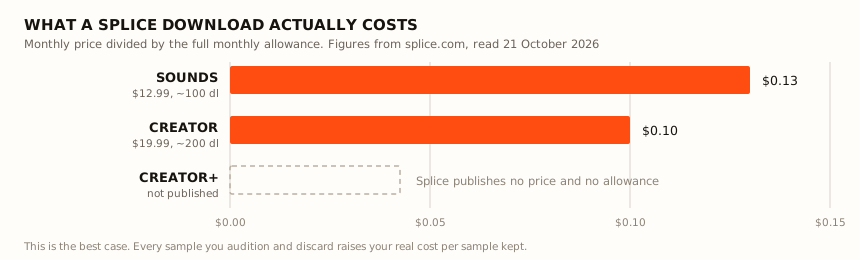
Those are best-case figures, and they assume you spend the whole allowance every month.
That is the honest core of it. You are renting access, and rented access only pays off at volume. If you open your DAW most weeks and ship something, the drip of fresh sounds is worth more than any single pack, and if you make four beats a year it is a standing order for a library you barely touch.
The mistake I see most is stockpiling. People burn credits hoarding loops for a project that never starts, which turns a subscription into an unsorted folder of 900 files. A smaller number of sounds you know deeply will always beat a hard drive you cannot navigate, which is the same argument the free versus paid breakdown makes about chasing every giveaway.
Rollover and Cancelling: The Two Questions Everyone Asks
Rollover first. Producers will tell you unused downloads carry into the next month, and they will tell you with total confidence, but I could not find that confirmed anywhere in Splice's own published pages. So treat it as unconfirmed, plan your month as though the counter resets, and check the current terms rather than a comment thread.
Cancelling is simpler and worth being clear-eyed about. The files on your drive are on your drive, and what ends is new downloads and catalogue access.
The friction is the mental accounting. A year of a sample subscription feels like building a library, but it is closer to a streaming bill, and the useful question is what you released during those twelve months. For what you are licensed to do with files you already pulled, read Splice's own terms, since that is a legal question and not a vibe.
When Splice Is Not the Right Call
Some ways of working just do not suit a credit counter. If you are a one-genre producer who wants a single dusty, tape-worn drum collection to live in for a year, a pack you own beats an allowance you reset.
The same goes for anyone on a tight month. A free tier plus two well-chosen paid packs will cover more ground than a subscription you cancel in week three, and picking packs properly matters more than library size either way.
The friction here is sunk cost. Once you have spent six months inside Splice's browser, every other platform feels wrong for about a week, which keeps people subscribed long after they stopped downloading anything.
So Which One Should You Pick
If you make beats most weeks and loops are a real part of how you write, Creator with the cheap first month is the one to try, and thirty days will tell you if you are hitting the ceiling. If you dig slowly and pull a handful of sounds a week, Sounds does the job for less.
If what you actually want is instruments and presets rather than a pile of samples, INSTRUMENT sidesteps the counter entirely. And if you looked at your last twelve months and found four unfinished sessions, keep the money and buy two packs you own.
Everything above is a snapshot of what Splice published in October 2026. Open splice.com/plans before you commit, because these numbers move.
Frequently Asked Questions
How much does Splice cost?
Splice lists Sounds at USD 12.99 a month billed yearly with about 100 downloads a month, and Creator at USD 19.99 a month at the regular rate with about 200 downloads a month and a USD 4.99 first month. INSTRUMENT is listed at USD 12.99 a month billed yearly. Prices and allowances change, so check splice.com/plans before you sign up.
What is a Splice credit?
A credit is what you spend to download one sample. One loop, one one-shot or one vocal take comes out of your monthly allowance, so a plan with about 100 downloads a month means roughly 100 individual files, not 100 packs.
Do Splice credits roll over to the next month?
I could not find official confirmation of a rollover policy in Splice's own published pages, only producers saying different things in forum threads. Treat rollover as unconfirmed, plan as if the month resets, and check the current terms on splice.com before you count on it.
Which Splice plan should I pick?
Pick Sounds if you pull a handful of sounds a week and want the lower price. Pick Creator if you build whole beats out of loops and keep running dry. Pick INSTRUMENT if you want the preset library and sound packs rather than a download allowance, since its presets do not use credits.
Is Splice worth it for beginners?
It is worth it if you sit down and make something most weeks, because a steady drip of fresh sounds beats one pack you have worn out. If you make four beats a year, the maths does not work, and a couple of paid packs you own outright will serve you better.
What happens to my Splice samples if I cancel?
The files you already downloaded are on your drive and stay there. What stops is new downloads and access to the catalogue, so the subscription is access you rent rather than a library you accumulate. For what you can release with files already pulled, read Splice's own license terms rather than a forum summary.
Related Articles
Best Hip-Hop Melody Loops & Loop Kits (2026)
We tested the top hip-hop melody loop packs for key accuracy, chord character, and how many loops actually make you want to start a beat.
Best Lo-Fi Sample Packs for Chill Beat Makers (2026)
Dusty drums, vinyl crackle and tape-warped melodies. The best lo-fi sample packs, compared on texture quality, inspiration rate and session usability.
Best Splice Alternatives: Free Options and Sites Like Splice (2026)
The best Splice alternatives for sample downloads, including a genuinely free Splice alternative and the sites like Splice worth paying for instead.

Jada Osei
Jada makes lo-fi beats, boom bap, and chill hop. She samples vinyl, builds beats on an SP-404 and in Ableton, and runs a YouTube beat-making channel with over 50K subscribers. She values vibe over perfection and believes the best sample packs sound like they were found, not manufactured.